🎯 Learning Objectives
- Use the distance sensor to detect objects.
- Use selection to make the rover react.
- Test and improve the rover’s movement through the ruins.
💬 Key Vocabulary
- Sensor
- Input
- Distance
- Selection
- Condition
- Variable
📝 Starter Activity
Think about the rover and the movement functions we created 2 lessons ago.
Answer these questions:
- Which function should our rover use if an object is very close in front of it?
- Which function should our rover use if the path in front of it is clear?
📖 Introduction
The rover is back inside the Martian ruins.
Last lesson, you planned every movement before the rover started. However, Lincolnshire Space Academy believes there may be more ruins to explore.
This time, the rover needs to move without being given every instruction.
It will use its distance sensor to check the path ahead.
If the path is clear, it will drive forward.
If an object is in front, it will turn right.

📖 Sensors
Sensors take in information from the world around us, such as:
- light
- sound
- temperature
- movement
- distance
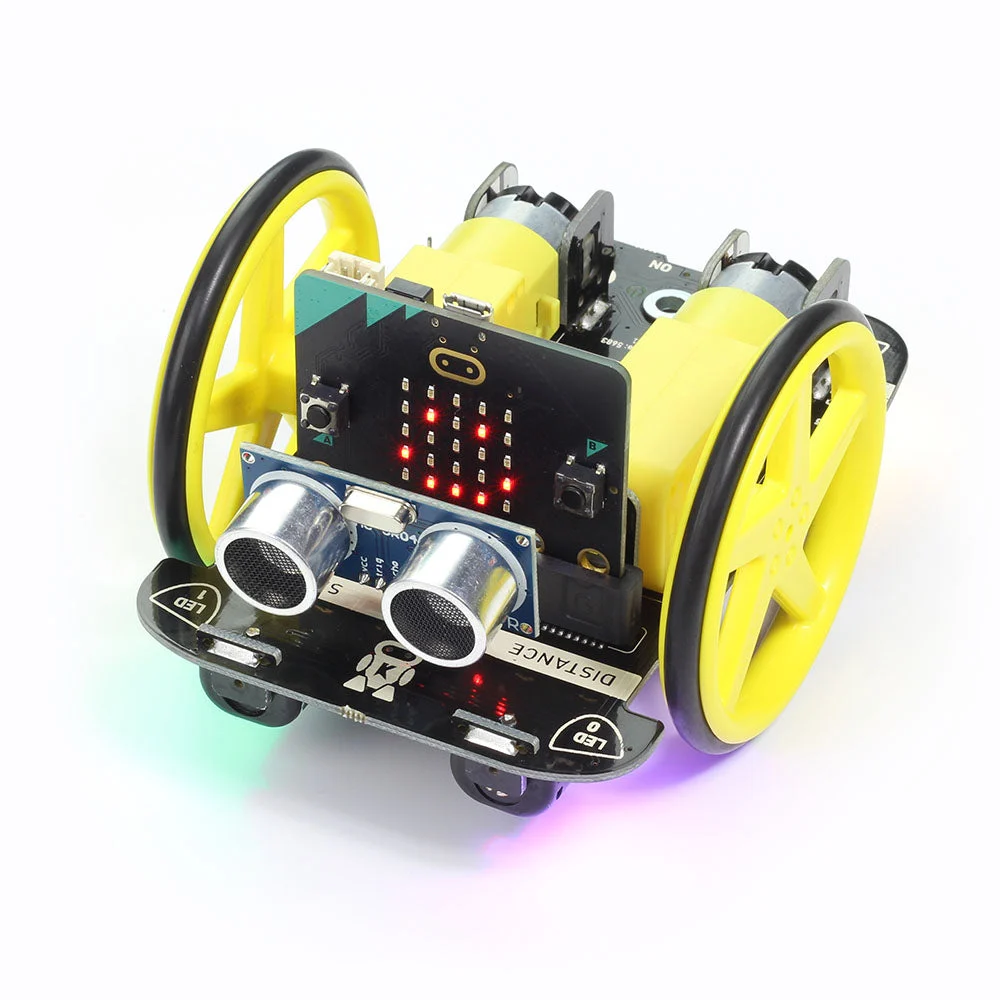
The Kitronik Motor uses an ultrasonic sensor to detect objects in front of it.
The sensor sends out a high-frequency sound wave. The sound bounces off an object and returns to the sensor, allowing it to work out how far away the object is.
We can then use selection to make the rover react:
IF an object is close
THEN turn right
ELSE drive forward🥇Level 1
Before the rover can explore the ruins on its own, Lincolnshire Space Academy needs to test its distance sensor.
The headlights will also help the satellites above Mars track the rover’s position while it moves through the ruins.
Your job is to make the rover check for objects in front of it.
If an object is closer than 3 cm, the headlights should turn red as a warning.
If the path is clear, the headlights should stay off.
On start pseudocode
set moveMotorZIP to MOVE Motor with 4 ZIP LEDs
set headlights to moveMotorZIP range from 0 with 4 LEDs
This tells the micro:bit which LEDs are being used as the rover’s headlights.
Forever loop pseudocode
Now add this logic inside a forever loop.
set Distance to measure distance

if Distance < 5 then
    headlights show color red
else
    headlights show color black
This means:
- the rover keeps measuring the distance
- if an object is closer than
3, the headlights flash blue and red - otherwise, the headlights stay off
🥈Level 2
The sensor test was successful, and the satellites can now track the rover through the ruins.
Lincolnshire Space Academy now wants the rover to react when it detects an obstacle.
Your job is to program the rover so that:
- if the path is clear, it drives forward
- if an object is closer than 5 cm, it stops and turns left
Use the movement functions you created in Lesson 1 and the distance sensor code from Level 1.
🥉Level 3
The rover can now move and react to objects, but it is not very efficient at travelling through the ruins.
Your task is to test the rover in the ruins and improve its program so it can reach the end.
You could try:
- turning right instead of left
- using both left and right turns
- counting how many turns the rover has made
- changing what the rover does after a certain number of turns
- measuring the distance before choosing which way to turn
Test one change at a time and keep the changes that improve the rover’s movement.
Extension
create a separate project and begin to develop the code from the document on using lights and sensors.
Download the document below
In this lesson, you…
- used the distance sensor to detect objects
- used selection to make the rover react
- tested and improved the rover so it could move through the ruins
Next lesson, you will…
- review the work you have completed this term
- look back at the skills you have developed
- reflect on what you have learned
🏅 Level up
🥇 Level 1
- Use the distance sensor to detect an object and change the rover’s headlights.
🥈 Level 2
- Use selection to make the rover drive forward or turn when it detects an object.
🥉 Level 3
- Test and improve the rover so it can move through the ruins more efficiently.