🎯 Learning Objectives
- Recognise that events can control the flow of a program
- Use a block-based programming language to create a sequence
- Use user input in an event-driven programming environment
- Use variables in an event-driven programming environment
💬 Key Vocabulary
- Event-driven programming
- ids
- parameters
- variables
- workspace
- sequence
- properties
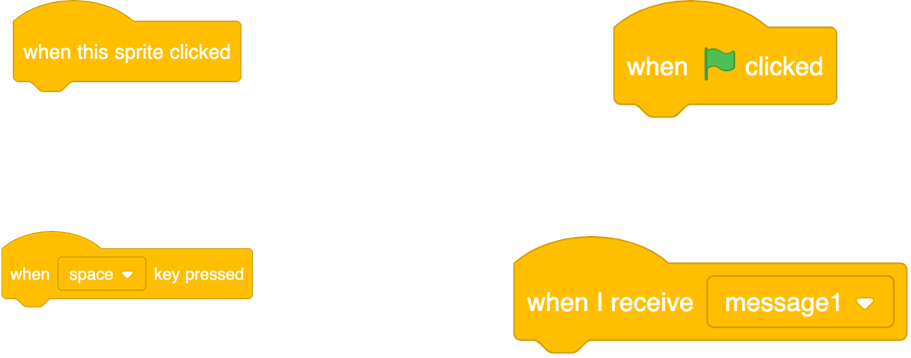
📝 Starter Activity – What do all these blocks have in common?
Answer

📖 Event-driven programming
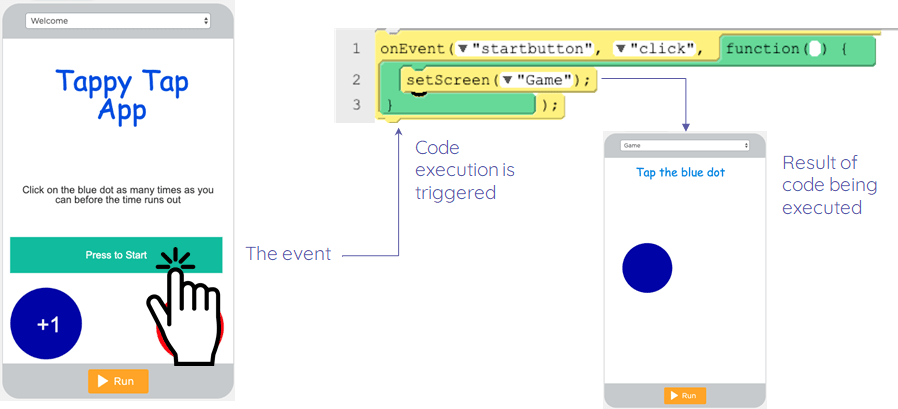
In event-driven programming, the flow of the program is controlled by events.
- Events can be user actions such as:
- Mouse clicks (or the touchscreen equivalent)
- Key presses Hovering over a picture
- Voice input (“OK Google…”)
Events can also be also be triggered by:
- Sensors (e.g. if movement is sensed, turn the light on)
- Messages from other programs

📝 Events in App Lab
Watch this video:
Sign into your account from last week.
Together we will now complete the following:
- Add the game and score screens
- Add an event that will move to the game screen when the Startbutton is clicked
- Add code that will automatically switch the screen to the score screen after five seconds

📝 Level 1,2,3: Game Development
Follow the instructions and challenges on the worksheet to develop your game further.
📝 Plenary – Ordering Events
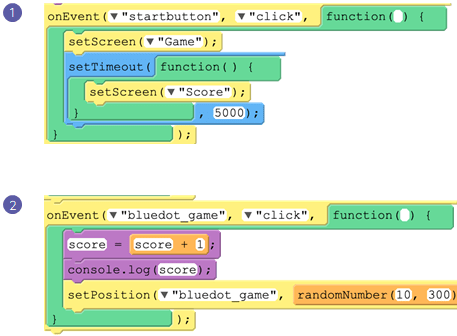
- What sequence should the two events be in?
- Does it matter?
- Justify your answer
Think/pair/share.
Answer
The sequence in which the events are ordered does not matter, as the code within the sequences is only executed once the event is triggered.
The sequence of the code inside the onEvent block is important.
In this lesson, you…
- Learnt about event-driven programming
- Used coding techniques to develop your mobile app further
Next lesson, you will…
- Look at how to debug common errors
- Develop the score screen of your app
- Start planning a project where you will develop your own app
🏅 Level up
🥇 Level 1
- Complete the Level 1,2,3: Game Development tasks and upload a screenshot of your code from App Lab to Teams.
🥈 Level 2
- Complete at least one Explorer Task in Level 1,2,3: Game Development and upload a screenshot of your code from App Lab to Teams.
🥉 Level 3
- Complete all three Explorer Tasks in Level 1,2,3: Game Development and upload a screenshot of your code from App Lab to Teams.