🎯 Learning Objectives
- How computers, IP addresses, routers and packets are used to send data between devices
- What a variable is and how we can use them in Scratch
- How to use the broadcast block in Scratch
- How to use loops (iteration) in Scratch
- How to use the ask and answer blocks in Scratch to receive user input in Scratch
💬 Key Vocabulary
- model
- communication
- iteration
- loops
- variable
- broadcast block
📝 Getting Started
- Go to the Scratch website and create a new project.
- Call the project “Virtual Network”.
- Delete the cat sprite.
- We’re going to need three sprites to start with.
- A computer
- A router
- A packet
- Save the below images and then upload them both to Scratch.

- To create the packet, use the paint tool in Scratch to create a small circle to represent a packet.
- We’ll name the sprite for the computer with an IP address.
- On most home networks the IP address will fall into the range of 192.168.1.1 up to 192.168.1.254. We’ll give our computer the first IP address, so call it
192.168.1.1 - We’ll name the Router
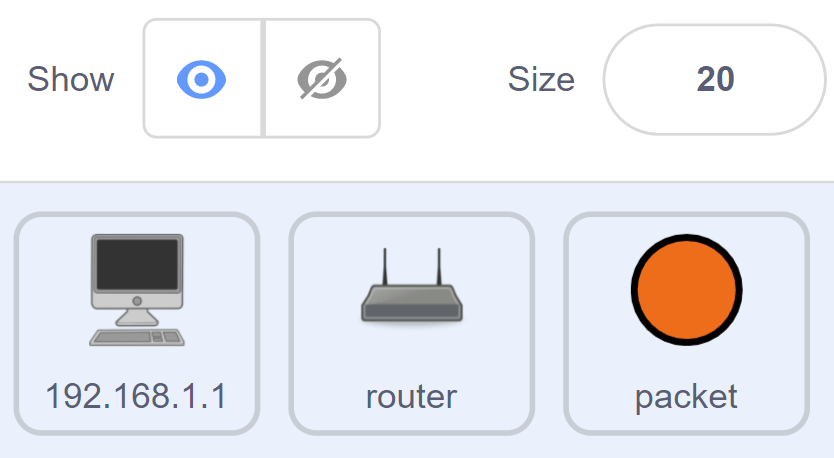
routerand the Packetpacket. - Here’s a screenshot of what the sprites should like so far:
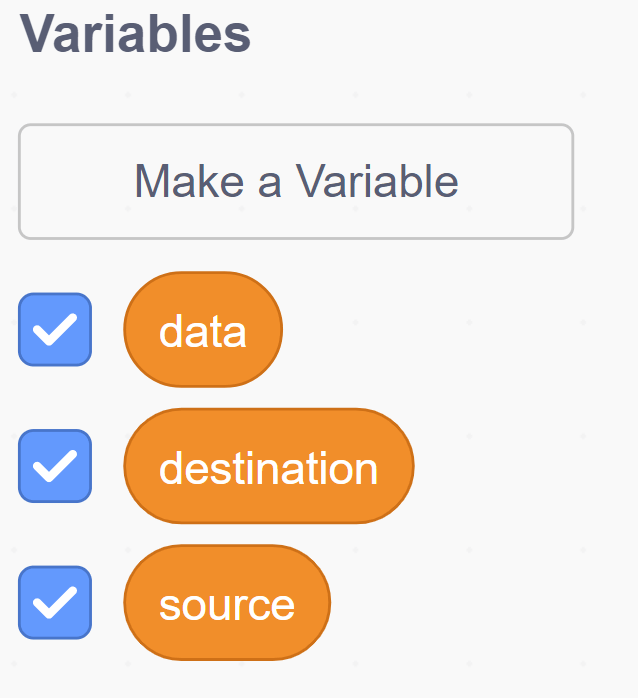
- Next we’ll need three variable, to represent the data the packet is going to contain.
- Create a variable called source.
- Create a variable called destination.
- Create a variable called data.
📝 Scripting the Computer
- Click on the computer sprite so that you can add scripts to it.
- The script we need is very simple.
- When the sprite is clicked, the variable
sourceneeds to be set to the name of the sprite (in this case 192.168.1.1), and a message needs to be broadcast calledCreate Packet)
When this sprite clicked
Set source to 192.168.1.1
Broadcast Create Packet
Try It
- We’ll need more than one Computer on our network.
- Duplicate the computer a few times (5 should be enough computers, but you can have more or less if you like)
- Rename each one so that it has a unique IP.
- Alter the script of each one so that it set’s the variable
sourceto the IP of the computer.
📝 Scripting the Packet
- The packet script is a little more complicated.
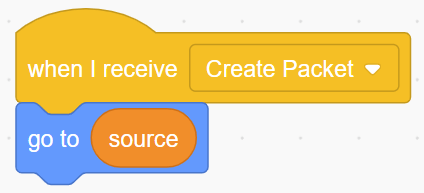
- The first thing we want to happen, is for the packet to appear on the computer that has been clicked.
- Next the packet needs to be provided with some information. The variable
sourcealready contains the sender’s IP, but the packet needs to know where it is going and what data it should carry.
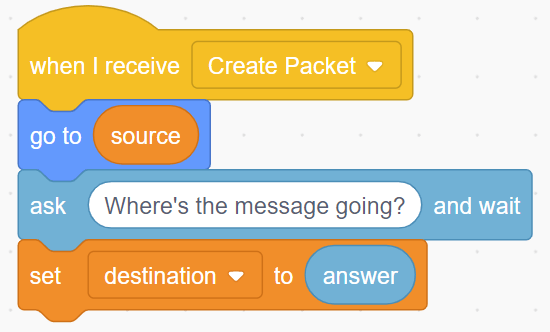
- Now get the packet to ask for a message and save the user’s input in the variable
data.
- For the next part we’ll need a loop.
- We’ll use a
Repeat untilloop to get the packet to move towards the router, until it touches it.
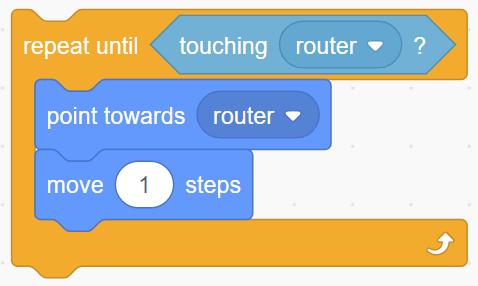
- Once the packet has reached the router, it’ll need to move off towards the computer that is currently stored in the variable
destination - Try to use another
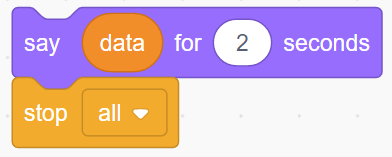
Repeat untilloop to do this. - Finally when the packet arrives at it’s destination, it can say the message that is stored in
datafor a couple of seconds and then the script can stop.
📝 Checking it works
Run your code, your finished project should look like this:
In this lesson, you…
- Used your knowledge about Domain Names, IP Addresses and DNS to create a model of a DNS using Scratch.
Next lesson, you will…
- Evaluate the How the Internet Works topic.
🏅 Level up
🥇 Level 1
- Upload a screenshot of your code as well as the core parts of it running:
- Asking for the destination
- Asking for the message
- The packet reaching the destination and saying the message
🥈 Level 2
- Alter your network model so that it includes a DNS look-up.
- The sending computer should ask for a name to send to the packet to.
- The IP address should then be searched for from a couple of lists.
- The packet can then be sent to the looked up IP address.
🥉 Level 3 – Build Your Own Network
- Draw a Diagram – Use a piece of paper or a drawing app like draw.io to sketch a diagram of a home network. Include the following:
- A router (the central hub of the network).
- A modem (connects the router to the internet).
- At least three devices (e.g., a phone, laptop, or smart TV).
- Use wired (Ethernet) and/or wireless (Wi-Fi) connections between devices.
- Label Your Diagram – Add labels to show:
- What each device is.
- How it connects to the network.
- Any important terms like IP address, Wi-Fi, Ethernet, or Internet Service Provider (ISP).
- Answer These Questions:
- What happens when you visit a website on your laptop? Describe how the request travels through your network to the internet.
- Why is a router important in a home network?
- How does a Wi-Fi connection differ from an Ethernet connection?