🎯 Learning Objectives
- What is a domain name and why we use them.
- What are IP addresses and why we use them.
- What is DNS and how it works and uses both domain names and IP addresses.
💬 Key Vocabulary
- domain name
- IP address
- Domain Name Server (DNS)
- Uniform Resource Locator (URL)
- Top Level Domain (TLD)
📖 URLs and Domain Names
- Look at your browser’s address bar. What ever is written there is the URL of the page you are on. What ever is written there after the
http://wwwbut before the first/is the domain name of the site you are on.
You’ll be very familiar with some domain names like:
google.com
facebook.com
yahoo.com
youtube.com
wikipedia.org
Add a description of URLs and Domain Names to a new Word document.
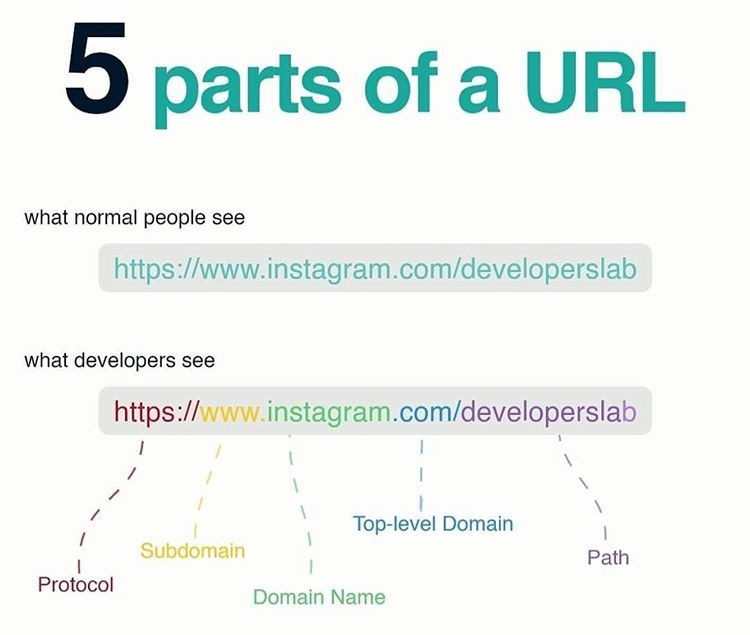
- There are lots of Top Level Domains available to website owners.
- .com, .org, and .co.uk are just some of a few.
- Gather a list of 10 other Top Level Domains that are available and add them to your Word document.
- Then explain what a Top Level Domain is and give some examples in your notes.
🌐 IP addresses
- Domain names are a little like addresses. For instance, the Prime Minister lives at:
10 Downing Street
London,
SW1A 2AA
- This is nice and easy for humans to say and remember.
- Another way of saying where the Prime Minister lives would be to use Longitude and Latitude.
51° 30′ 12.23″ N, 0° 7′ 39.5″ W
- This is tricky for a human to remember but great for a computer.
- Domain names are like addresses, they are designed for humans to read and remember. In reality a computer’s address (that allows other computers on a network or the internet to find it), is made up of numbers.
- Computer use
IP addressesto send messages to each other.
Your computer’s current IP address should be shown below.
- We need domain names because IP addresses are too difficult for humans to remember.
- Imagine typing in this every time you needed to go to a certain web address. Try the following in your home browser and see where each of the IP addresses takes you to. Note: those will not work inside school as accessing websites by IP addresses are blocked.
http://216.58.198.163
Present It
- Answer the following questions in your notes.
- What is a domain name?
- What is an IP address?
- Why do humans not use IP addresses?
📛 DNS
You can use the following animated tutorial to help you understand how DNS work
In this lesson, you…
- Explored the technical side of the internet by looking at Domain Names, IP addresses and DNS.
Next lesson, you will…
- Use Scratch to model a DNS using lists and linear search.
🏅 Level up
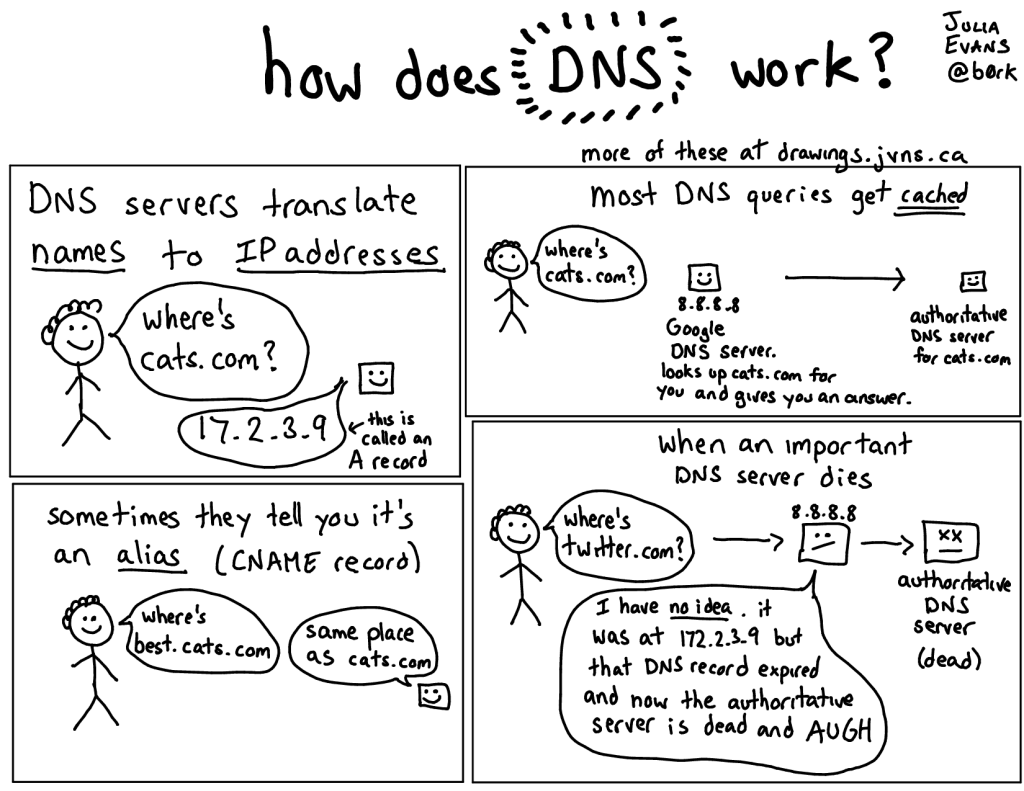
- Imagine you had to explain DNS to somebody who had no idea what it was.
- Using whatever software you like (or pen and paper if you prefer), create a piece of work that you could use to help explain DNS to someone. You could create a poster, a presentation, a report, an illustrated art work. It’s really up to you.
- You’ll be awarded Level 2 or 3, depending on your teacher’s assessment of your understanding of DNS.
🥇 Level 1
- Upload your notes on Domain Names, IP Addresses and DNS.
🥈 Level 2
- Your piece of work shows a good understanding of DNS.
🥉 Level 3
- Your piece of work shows excellent understanding of DNS.