🎯 Learning Objectives
- Use iteration (
whileloops) to control the flow of program execution - Use variables as counters in iterative programs
💬 Key Vocabulary
- Iteration
- selection
- counting
- execution
- walk-through
- conditions
📖 Iteration

- When your programs repeat actions, checking for a terminating condition at the beginning of each new loop this is called a
whileloop.

- You will need a
whilestatement: when your program needs to repeat actions while a condition is satisfied.
📝 Level 1 – Count
Question
- What will the extended program on the right display when it is executed?
- Use your worksheet to answer.
- Then, move on to the rest of the tasks.

📝 Level 2/3 – Times Table
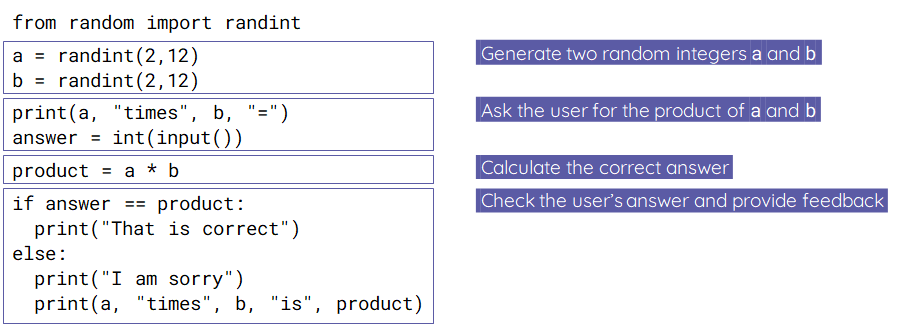
- Copy the code for the task from the worksheet below and then paste it into Thonny.
- Complete the tasks in your worksheet to build a more complete times tables practice game.
In this lesson, you…
- Used iteration (while statements) to allow the flow of program execution to include loops
- Used variables as counters
Next lesson, you will…
- Apply what you’ve learnt and use iteration even more!
- Take a quiz, to assess what you’ve learnt
🏅 Level up
🥇 Level 1
- Complete the Level 1 – Count worksheet.
- Upload the worksheets with a screenshot of your code for Task in the worksheet to Teams.
🥈 Level 2
- In the Level 2/3 – Count worksheet complete the Level 2 task and then screenshot your code in Thonny and upload it to Teams.
🥉 Level 3
- In the Level 2/3 – Count worksheet complete the Level 3 tasks and then screenshot your code in Thonny and upload it to Teams.